You don’t need a phone or tablet to try out your app. With Test in Web, App Inventor runs your app in its own window on your computer, right beside the Designer and Blocks Editor. There’s nothing to install.
-
Open your project in App Inventor
Open App Inventor and start a new project, or open one you’ve already made.
-
Choose Connect › Test in Web
In the menu bar at the top, click Connect, then choose Test in Web.
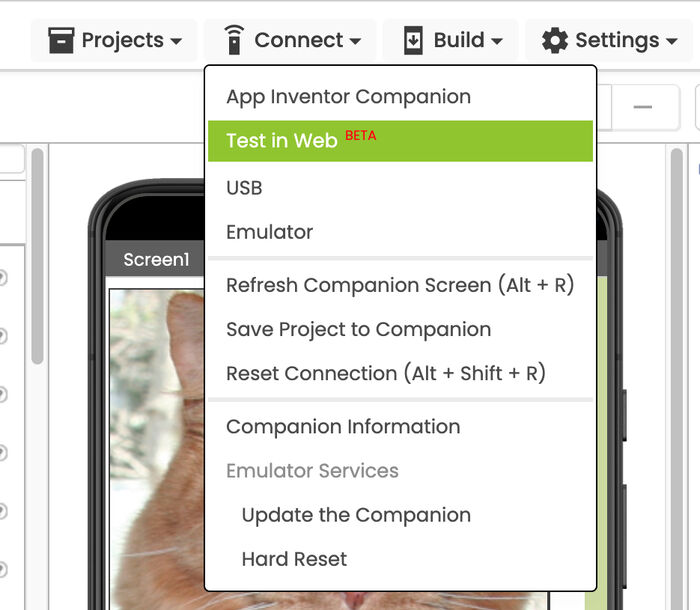
Pick Test in Web, not Emulator. Emulator is the older option, and it needs extra software installed on your computer.
-
Try your app in its own window
Your app opens in a new window. Click it the way you would tap a phone screen. Keep the window open while you build, and the changes you make in App Inventor show up there.
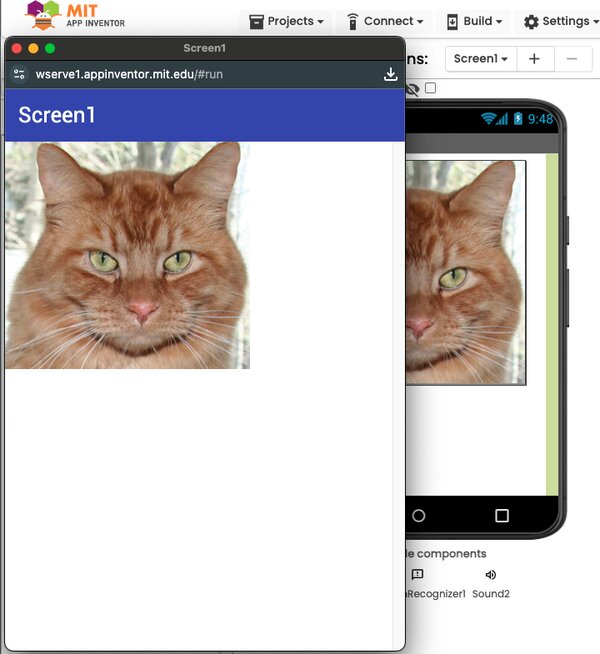
Test in Web is new (Beta). If part of your app doesn’t work there, try it on a phone or tablet with the free MIT App Inventor Companion app, and tell us about it in the App Inventor Community.
What’s next
- Pick something to build: Short tutorials to start with
- Run your app on your own phone or tablet with the free MIT App Inventor Companion app
- All the ways to test your apps